> ## Documentation Index
> Fetch the complete documentation index at: https://docs.hel.io/llms.txt
> Use this file to discover all available pages before exploring further.
# No Code
> Get started on MoonPay Commerce and launch crypto payments in minutes
# Getting Started
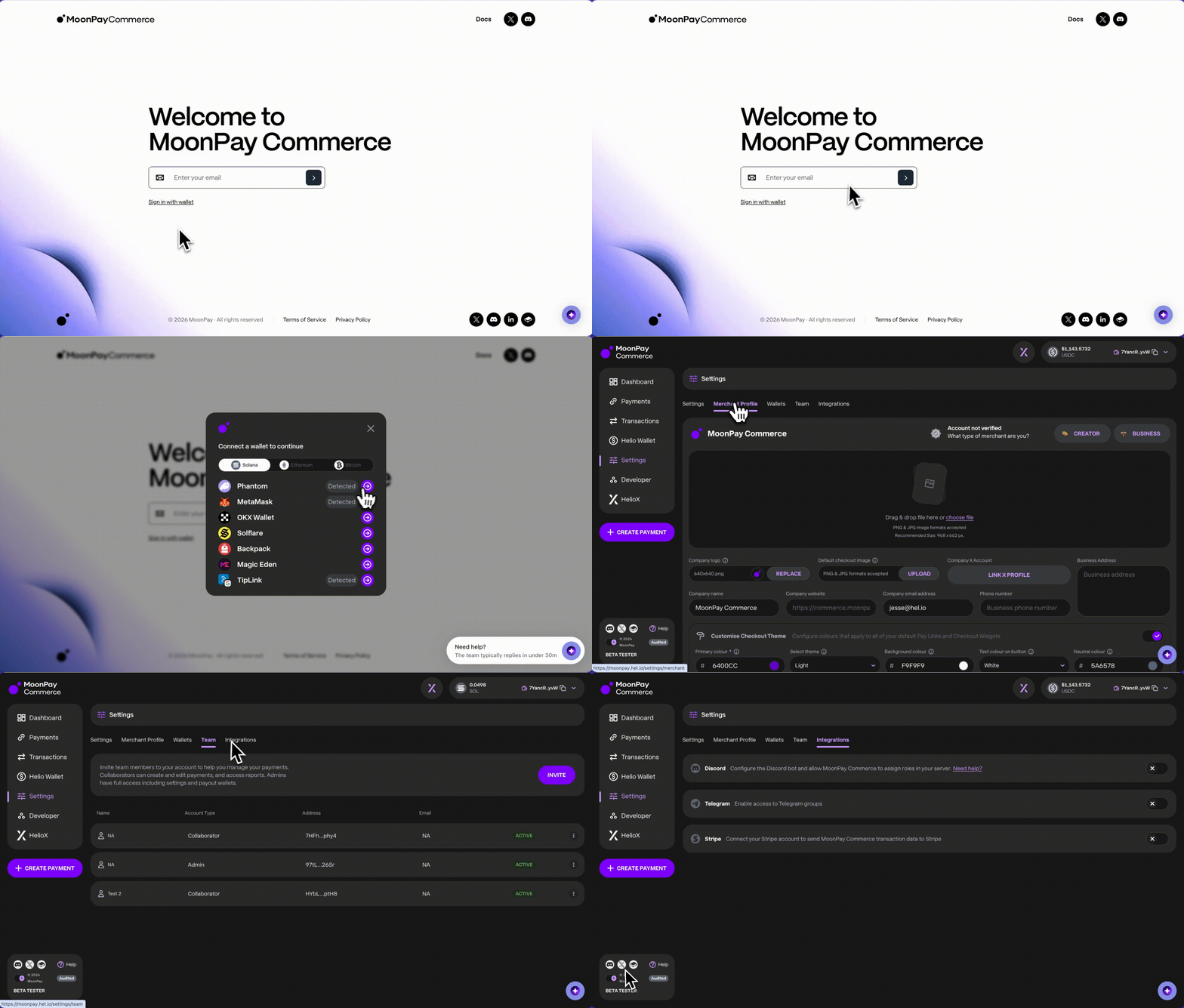
* Log into [moonpay.hel.io](https://moonpay.hel.io/) or [moonpay.dev.hel.io](https://moonpay.dev.hel.io/) with an email or wallet, then use Settings to finish your profile, set up wallets, and invite team members.
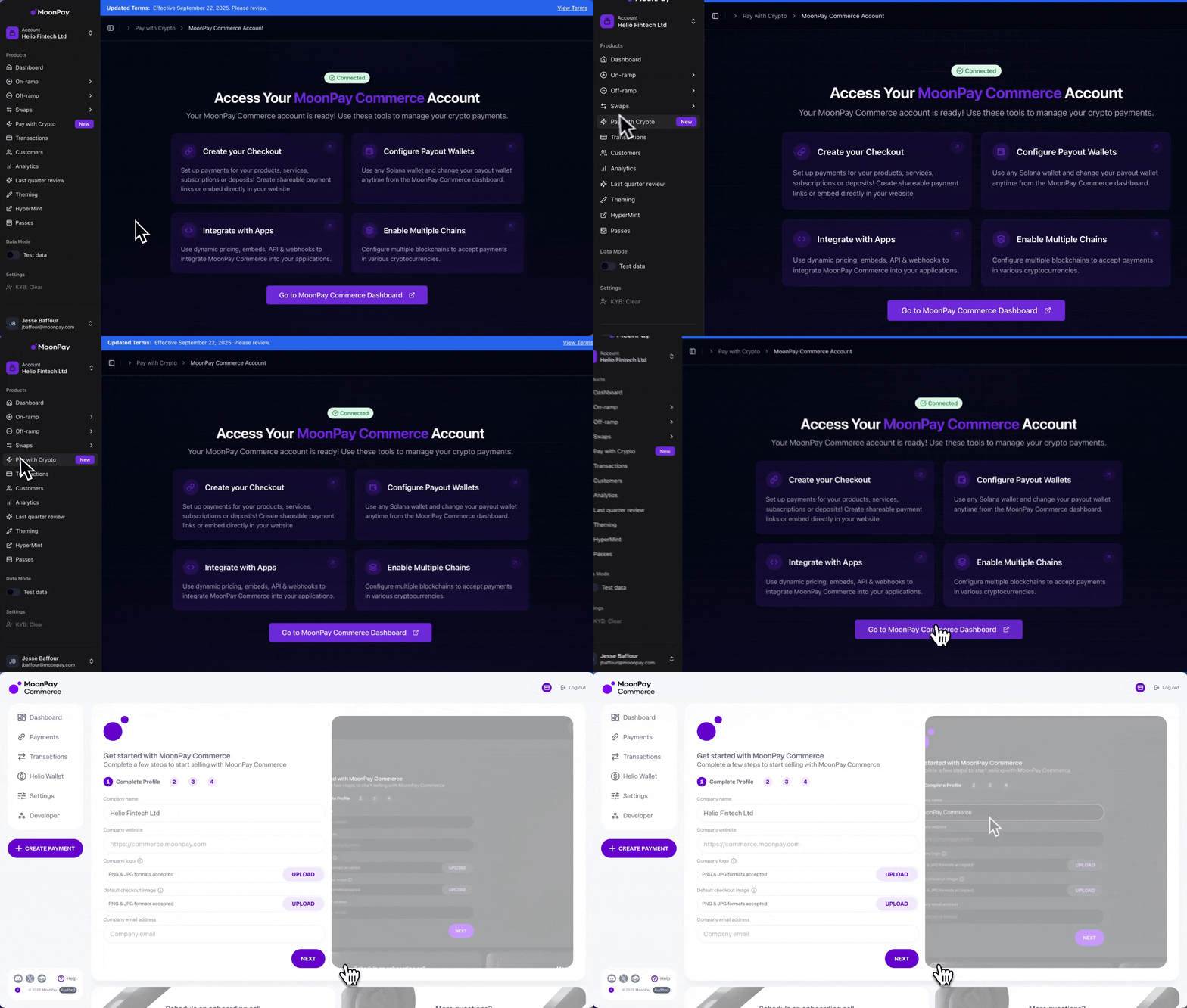
 * If you're an existing MoonPay customer, Log in to the [MoonPay Dashboard](https://dashboard.moonpay.com) and select Pay with Crypto > Go to MoonPay Commerce Dashboard. Your account and existing KYB data will sync automatically.
 ## Embedded Wallet
If you sign up via email, we automatically create an embedded wallet for you. You don’t need a browser extension, seed phrases, or an existing wallet, making onboarding seamless and enabling instant access to Web3 apps.
For users who previously used the Helio wallet, the new login flow uses a different wallet setup. To move funds from your existing Helio wallet, visit [https://legacy.hel.io/](https://legacy.hel.io/) and follow the transfer steps.
***
# Create Payments
MoonPay Commerce supports four payment types:
1. **Pay Links** - MoonPay hosted checkout page
2. [**Checkout Widget**](https://docs.hel.io/docs/checkout-widget#/) - embed payments in your app
3. [**Deposits**](https://docs.hel.io/docs/deposits#) - accept any crypto inside your app
4. [**Subscriptions**](https://docs.hel.io/docs/subscriptions#/) - recurring payments
**Pay Link Creation Flow:**
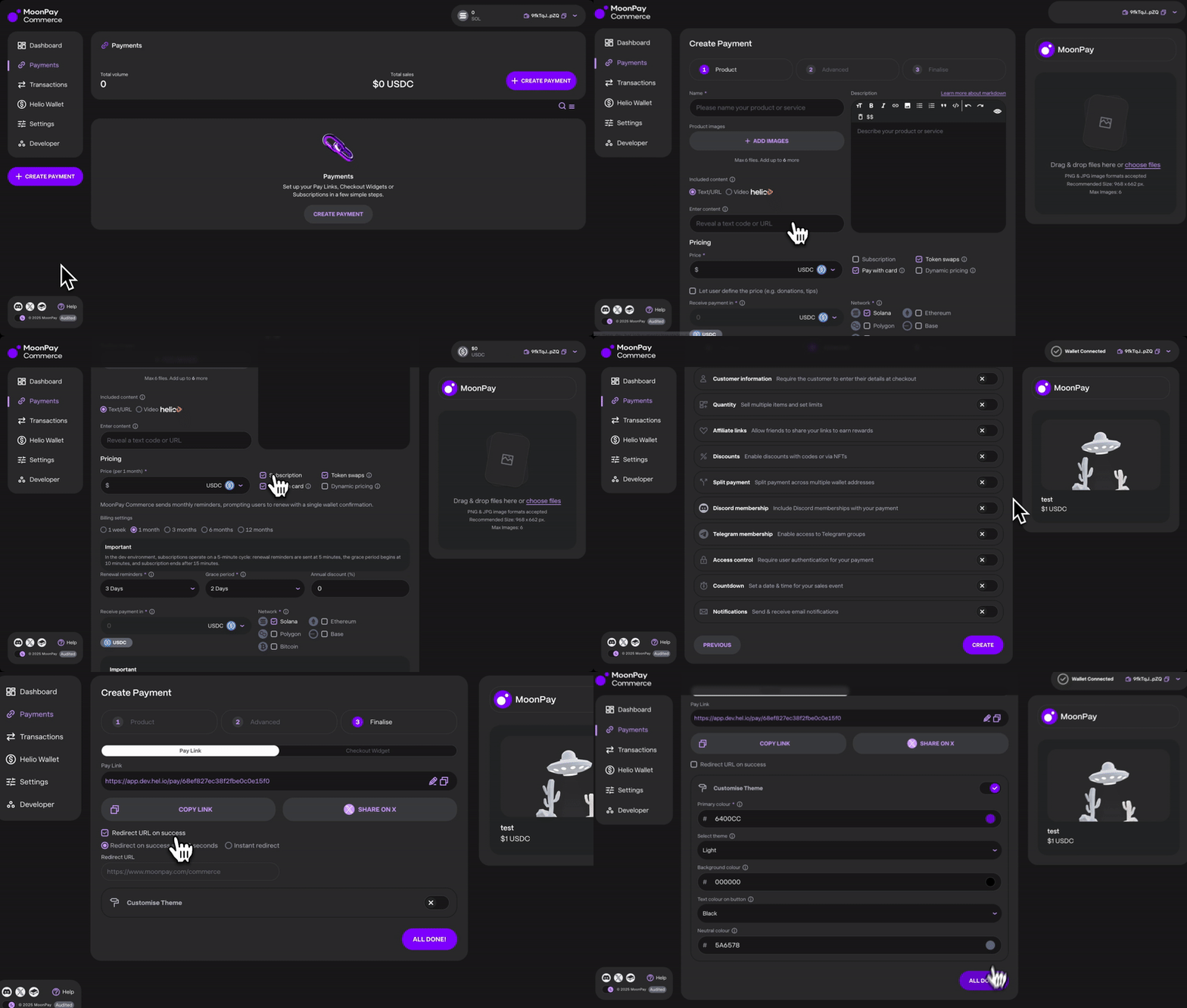
* **Set product details:** name, price, payout wallets, networks, card payments, swaps, and dynamic pricing.
* **Subscriptions** include billing intervals (weekly, monthly, quarterly, biannual, yearly), renewal reminders, grace periods, and annual discounts.
### Token Swaps
Allow customers to pay with any supported token while you receive **USDC** (0.25% conversion fee). Can be configured via the UI or the [API](https://docs.hel.io/reference/paylink/overview#token-swaps). Choose how payments are settled:
**USDC on Solana only**
All payments, regardless of the original blockchain or token used, are converted into **USDC on Solana** (ETH, MATIC, or SOL → USDC on Solana)
**USDC on Base & Solana**
* EVM payments (any chain/token) → **USDC on Base** (ETH, MATIC, AVAX → USDC on Base)
* Solana payments (any token) → **USDC on Solana** (SOL or SPL tokens → USDC on Solana)
You can only receive funds on EVM networks like Arbitrum and BNB Chain when Token Swaps are enabled. If Token Swaps are disabled, you can’t receive directly in these currencies.
* **Advanced options:** [affiliate links](https://docs.hel.io/docs/affiliate-links#/), [discounts](https://docs.hel.io/docs/discounts#/), [split payments](https://docs.hel.io/docs/split-payments#/), [Discord](https://docs.hel.io/docs/discord-memberships#/)/[Telegram](https://docs.hel.io/docs/telegram-memberships#/) memberships, and [gated payments](https://docs.hel.io/docs/gated-payments#/).
* **Final customisation:** pay link theme (light/dark mode, colors), success redirect URL.
## Embedded Wallet
If you sign up via email, we automatically create an embedded wallet for you. You don’t need a browser extension, seed phrases, or an existing wallet, making onboarding seamless and enabling instant access to Web3 apps.
For users who previously used the Helio wallet, the new login flow uses a different wallet setup. To move funds from your existing Helio wallet, visit [https://legacy.hel.io/](https://legacy.hel.io/) and follow the transfer steps.
***
# Create Payments
MoonPay Commerce supports four payment types:
1. **Pay Links** - MoonPay hosted checkout page
2. [**Checkout Widget**](https://docs.hel.io/docs/checkout-widget#/) - embed payments in your app
3. [**Deposits**](https://docs.hel.io/docs/deposits#) - accept any crypto inside your app
4. [**Subscriptions**](https://docs.hel.io/docs/subscriptions#/) - recurring payments
**Pay Link Creation Flow:**
* **Set product details:** name, price, payout wallets, networks, card payments, swaps, and dynamic pricing.
* **Subscriptions** include billing intervals (weekly, monthly, quarterly, biannual, yearly), renewal reminders, grace periods, and annual discounts.
### Token Swaps
Allow customers to pay with any supported token while you receive **USDC** (0.25% conversion fee). Can be configured via the UI or the [API](https://docs.hel.io/reference/paylink/overview#token-swaps). Choose how payments are settled:
**USDC on Solana only**
All payments, regardless of the original blockchain or token used, are converted into **USDC on Solana** (ETH, MATIC, or SOL → USDC on Solana)
**USDC on Base & Solana**
* EVM payments (any chain/token) → **USDC on Base** (ETH, MATIC, AVAX → USDC on Base)
* Solana payments (any token) → **USDC on Solana** (SOL or SPL tokens → USDC on Solana)
You can only receive funds on EVM networks like Arbitrum and BNB Chain when Token Swaps are enabled. If Token Swaps are disabled, you can’t receive directly in these currencies.
* **Advanced options:** [affiliate links](https://docs.hel.io/docs/affiliate-links#/), [discounts](https://docs.hel.io/docs/discounts#/), [split payments](https://docs.hel.io/docs/split-payments#/), [Discord](https://docs.hel.io/docs/discord-memberships#/)/[Telegram](https://docs.hel.io/docs/telegram-memberships#/) memberships, and [gated payments](https://docs.hel.io/docs/gated-payments#/).
* **Final customisation:** pay link theme (light/dark mode, colors), success redirect URL.
 ## Pay with QR Code
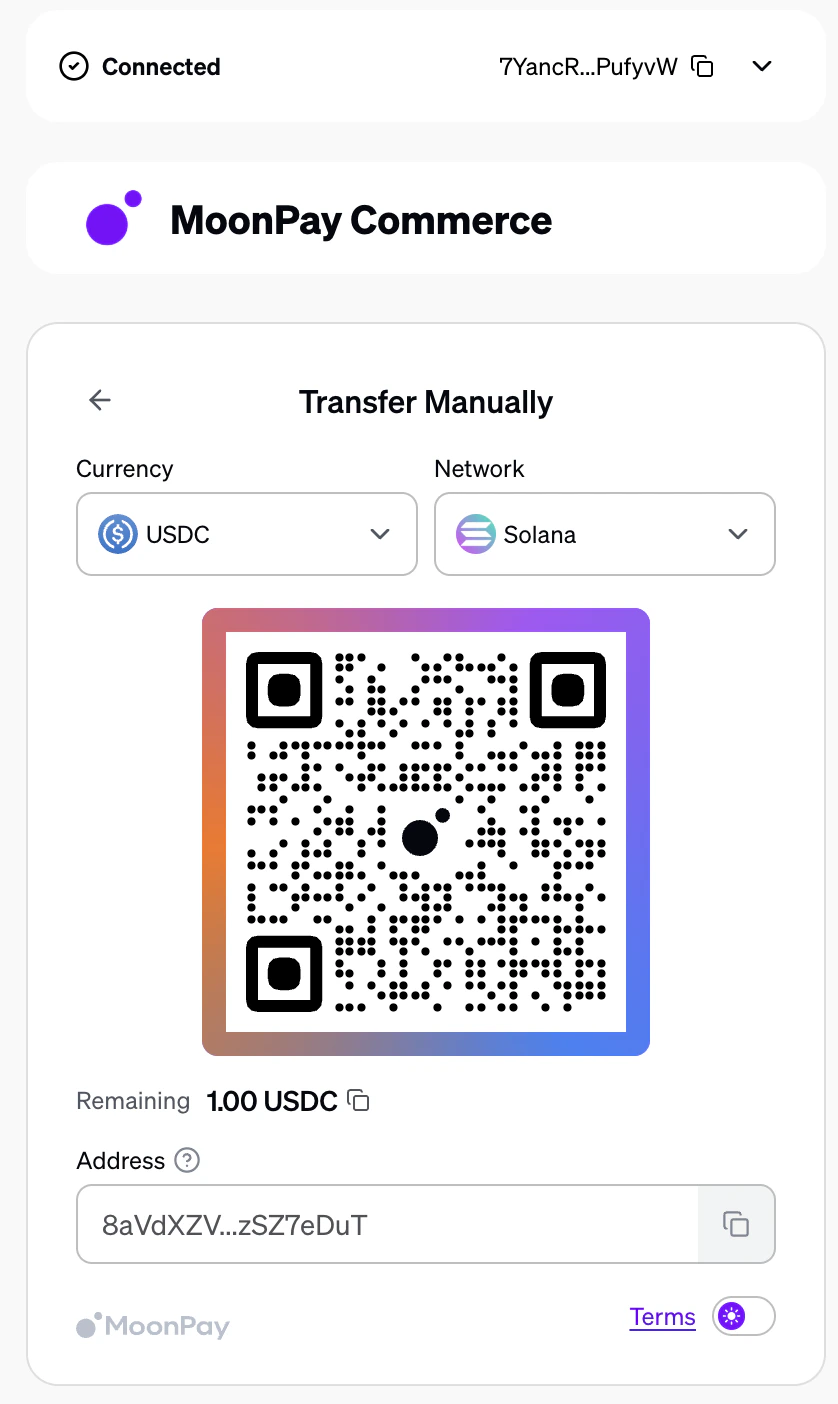
When an end user pays via QR code on a charge page, the payment uses a deposit-style flow. The user scans the QR code and sends funds directly to complete the payment.
* **Underpayment:** If the user sends less than the required amount, they will be prompted to deposit the remaining balance until the full payable amount is reached.
* **Overpayment:** If the user sends more than the required amount, the entire deposited amount will be forwarded to the merchant.
## Pay with QR Code
When an end user pays via QR code on a charge page, the payment uses a deposit-style flow. The user scans the QR code and sends funds directly to complete the payment.
* **Underpayment:** If the user sends less than the required amount, they will be prompted to deposit the remaining balance until the full payable amount is reached.
* **Overpayment:** If the user sends more than the required amount, the entire deposited amount will be forwarded to the merchant.
 ***
# Managing Payments
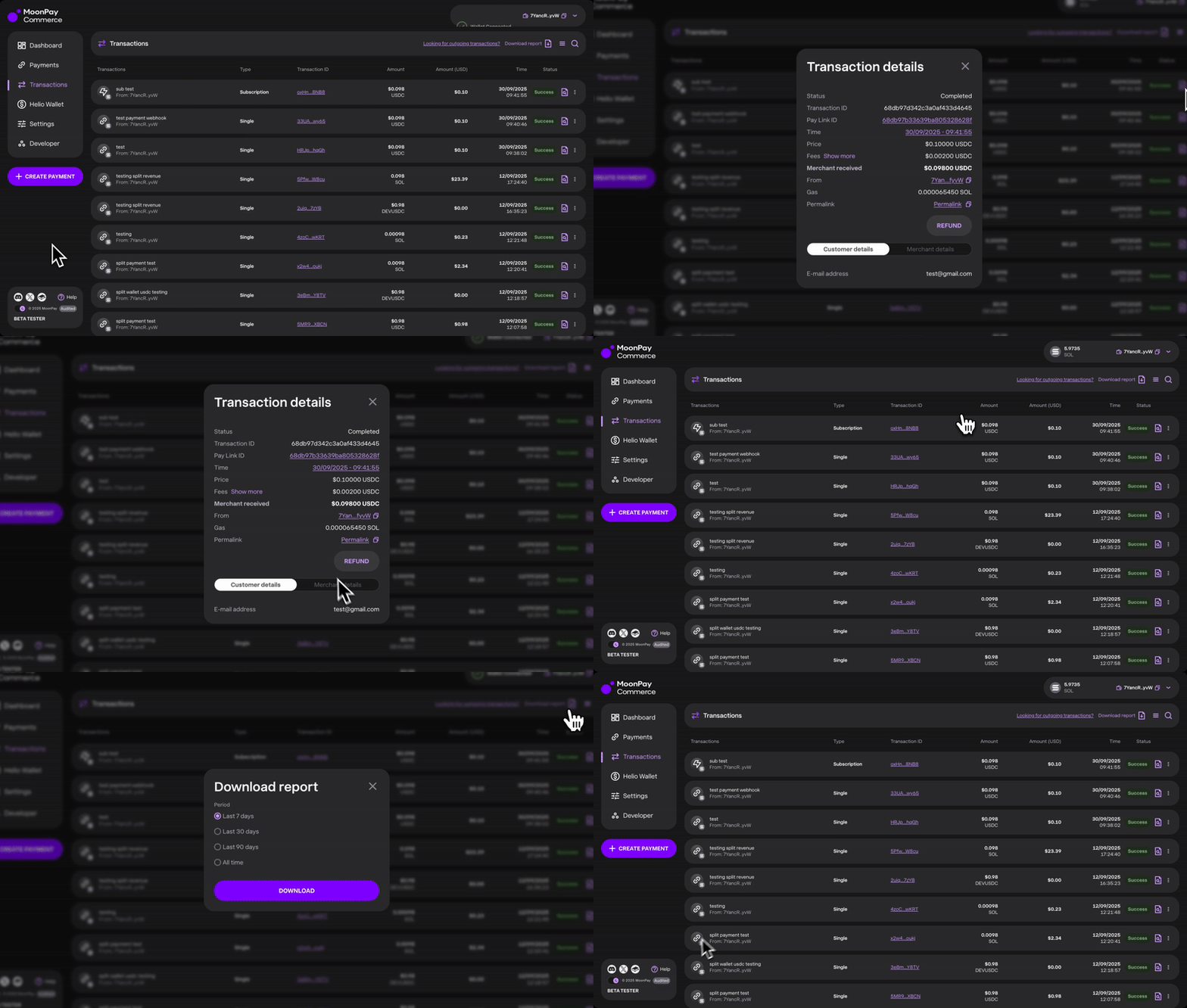
* All transactions appear in the dashboard under the Transactions tab. Each record shows the type of payment (single, subscription, or refund), transaction ID, amount, time, and detailed information.
* From here, you can also issue refunds when needed.
* For reporting, all transaction data can be exported as a CSV file.
***
# Managing Payments
* All transactions appear in the dashboard under the Transactions tab. Each record shows the type of payment (single, subscription, or refund), transaction ID, amount, time, and detailed information.
* From here, you can also issue refunds when needed.
* For reporting, all transaction data can be exported as a CSV file.
 ### Updating Your Payout Wallet
If you need to change the wallet that receives payments:
1. Go to **Settings → Wallets** in your Helio Dashboard.
2. Add a **Linked** or **Payout Wallet**.
3. When creating a payment (Step 1 of the payment creation flow), you can choose which wallet will receive the funds for that specific payment.
### Updating Your Payout Wallet
If you need to change the wallet that receives payments:
1. Go to **Settings → Wallets** in your Helio Dashboard.
2. Add a **Linked** or **Payout Wallet**.
3. When creating a payment (Step 1 of the payment creation flow), you can choose which wallet will receive the funds for that specific payment.
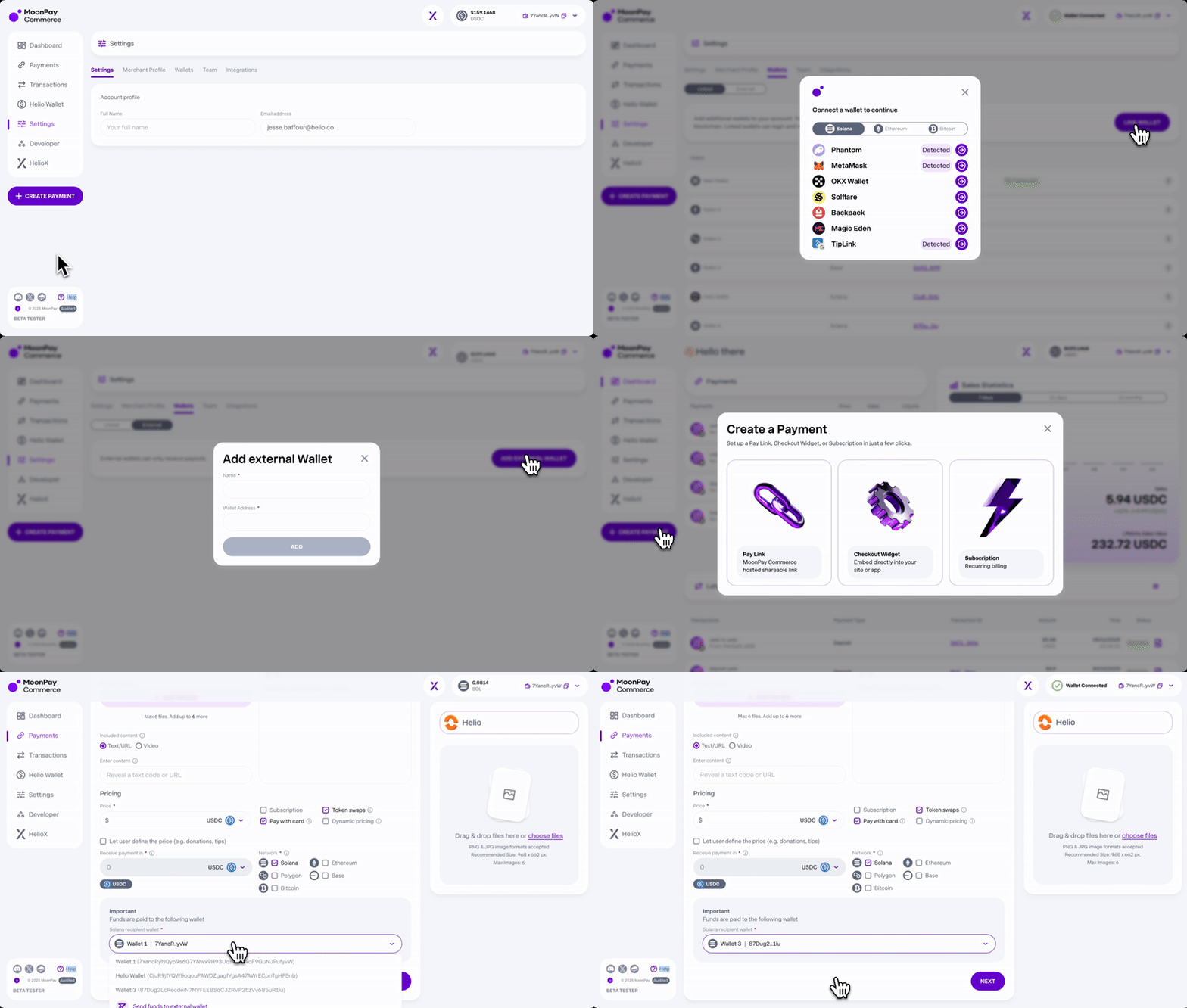 **Note:** Your **main wallet** is used as the **default recipient** for all payments unless another wallet is explicitly selected during payment setup.
***
# No Code Integrations
MoonPay Commerce also makes integration simple with out-of-the-box options, including:
* [Shopify Solana Pay Plugin](https://docs.hel.io/docs/solana-pay-shopify-plugin#/)
* [Telegram Bot Integration](https://docs.hel.io/docs/telegram-memberships#/)
* [Discord Bot Integration](https://docs.hel.io/docs/discord-memberships#/)
**Note:** Your **main wallet** is used as the **default recipient** for all payments unless another wallet is explicitly selected during payment setup.
***
# No Code Integrations
MoonPay Commerce also makes integration simple with out-of-the-box options, including:
* [Shopify Solana Pay Plugin](https://docs.hel.io/docs/solana-pay-shopify-plugin#/)
* [Telegram Bot Integration](https://docs.hel.io/docs/telegram-memberships#/)
* [Discord Bot Integration](https://docs.hel.io/docs/discord-memberships#/)