> ## Documentation Index
> Fetch the complete documentation index at: https://docs.hel.io/llms.txt
> Use this file to discover all available pages before exploring further.
# For Developers
> Get started on MoonPay Commerce as a developer and build custom crypto payment flows
# Getting Started
* Log into [moonpay.hel.io](https://moonpay.hel.io/) or [moonpay.dev.hel.io](https://moonpay.dev.hel.io/) with a wallet or email, then use Settings to finish your profile, set up wallets, and invite team members.
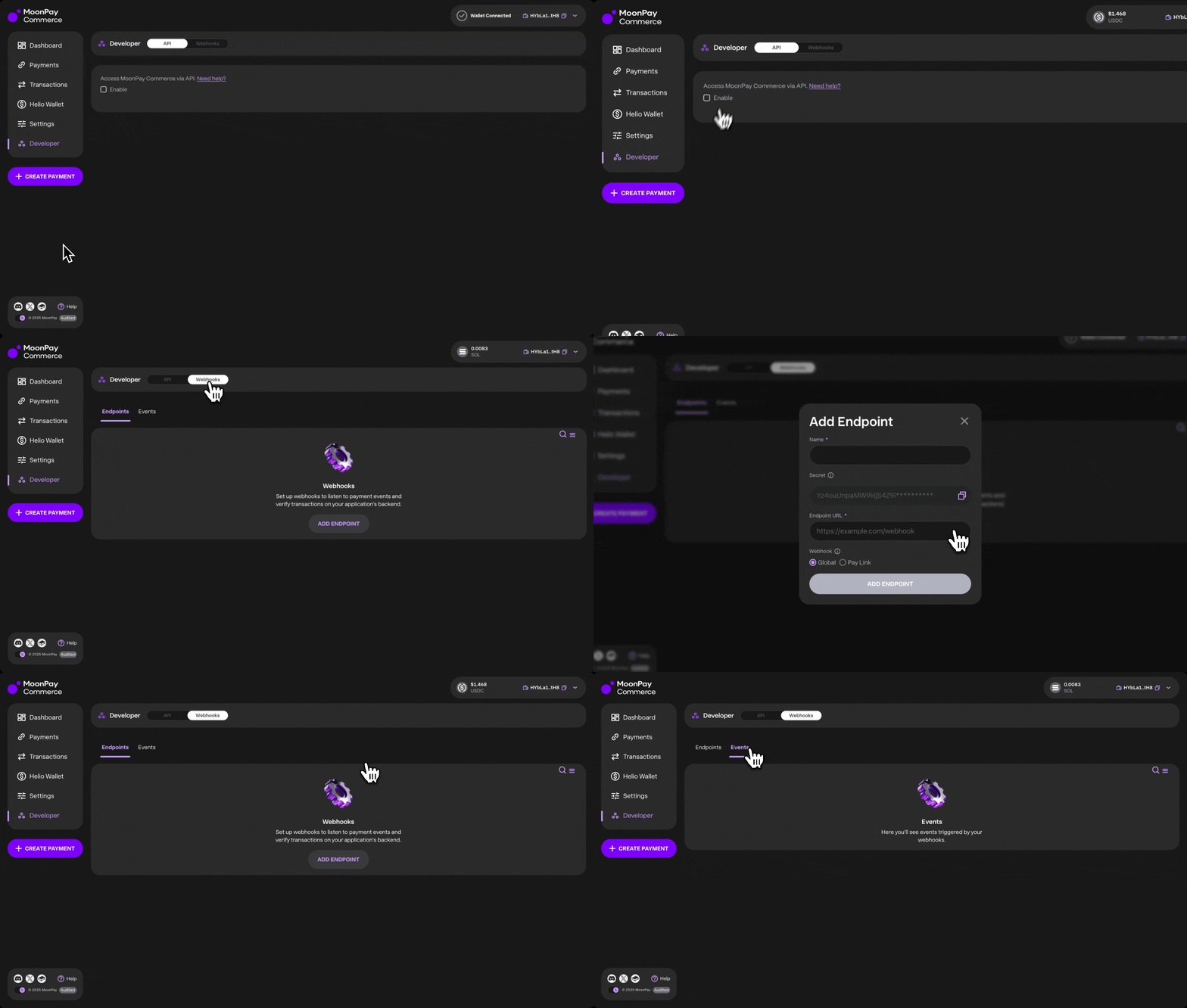
* The Developer section provides full access to MoonPay Commerce's API and webhooks.
* Check out the [API Reference](https://docs.hel.io/reference#/) for detailed endpoints, parameters, and response formats.
* [**Webhooks**](https://docs.hel.io/reference/webhook/overview#/): The webhooks panel allows you to create new webhooks, track event deliveries, and replay failed events as needed.
MoonPay Commerce also provides an [SDK for developers](https://docs.hel.io/docs/helio-sdk#/).
 # Payment Integration Options
Developers can initiate payments using two primary methods: Pay Links (via `paylinkId`) for structured checkouts, or Deposits (via `depositId`) for flexible, wallet-to-wallet transfers in any crypto.
**Pay Links:** [Generate via API](https://docs.hel.io/reference/paylink/overview) to configure product details, pricing, themes, and redirect URLs.
* Dynamic Pay Links: For flexible pricing, set `"dynamic": true` in the features object. This allows you to define the specific `amount` at the time of payment / charge creation rather than use the same fixed price at the `paylinkId` level.
* Charges: Use a `paylinkId` to create [one-off Charges](https://docs.hel.io/docs/charges) for single-use payments. You can pass custom JSON (e.g., customer IDs or SKU data) with each request.
* Subscriptions: Programmatically manage [recurring billing](https://docs.hel.io/docs/subscriptions#/) with full control over intervals, grace periods, and renewal reminders.
**Deposits:** [Set up Deposits](https://docs.hel.io/reference/deposits/create) to create unique `depositCustomers`and associated deposit addresses across SVM, EVM, and BTC networks. This method is optimized for letting users fund your app with any crypto, ideal for gaming deposits, embedded wallets & trading apps.
# Embed Widgets
* Embed a `paylinkId` as a [Checkout Widget](https://docs.hel.io/docs/checkout-widget#/) in your application for a seamless payment experience. The widget supports customisation and integrates with all the same features as Pay Links.
* Embed a `depositId` as a [Deposit Widget](https://docs.hel.io/docs/deposits#3-serve-the-deposit-ui-in-your-app) in your app
Test and customise your configurations with our easy to use [Widget Builder](https://demo.hel.io/)
# Transaction Management
Using the API, you can export all transactions from your account and apply filters such as `paylinkId` or `depositId`, sender key, or date range. This makes it easy to build custom reporting or integrate transaction data into your own systems. See txs endpoint for [depositId](https://docs.hel.io/reference/deposits/list-transactions) and [paylinkId](https://docs.hel.io/reference/transactions/list).
# Code Integrations
MoonPay Commerce also supports more advanced, code-driven integrations, including:
* [Create subscription payments via API](https://docs.hel.io/docs/subscriptions#setting-up-a-subscription)
* [Headless payments](https://docs.hel.io/docs/headless-payments#/)
* [Platform APIs merchant account creation](https://docs.hel.io/reference/platform/overview)
# Payment Integration Options
Developers can initiate payments using two primary methods: Pay Links (via `paylinkId`) for structured checkouts, or Deposits (via `depositId`) for flexible, wallet-to-wallet transfers in any crypto.
**Pay Links:** [Generate via API](https://docs.hel.io/reference/paylink/overview) to configure product details, pricing, themes, and redirect URLs.
* Dynamic Pay Links: For flexible pricing, set `"dynamic": true` in the features object. This allows you to define the specific `amount` at the time of payment / charge creation rather than use the same fixed price at the `paylinkId` level.
* Charges: Use a `paylinkId` to create [one-off Charges](https://docs.hel.io/docs/charges) for single-use payments. You can pass custom JSON (e.g., customer IDs or SKU data) with each request.
* Subscriptions: Programmatically manage [recurring billing](https://docs.hel.io/docs/subscriptions#/) with full control over intervals, grace periods, and renewal reminders.
**Deposits:** [Set up Deposits](https://docs.hel.io/reference/deposits/create) to create unique `depositCustomers`and associated deposit addresses across SVM, EVM, and BTC networks. This method is optimized for letting users fund your app with any crypto, ideal for gaming deposits, embedded wallets & trading apps.
# Embed Widgets
* Embed a `paylinkId` as a [Checkout Widget](https://docs.hel.io/docs/checkout-widget#/) in your application for a seamless payment experience. The widget supports customisation and integrates with all the same features as Pay Links.
* Embed a `depositId` as a [Deposit Widget](https://docs.hel.io/docs/deposits#3-serve-the-deposit-ui-in-your-app) in your app
Test and customise your configurations with our easy to use [Widget Builder](https://demo.hel.io/)
# Transaction Management
Using the API, you can export all transactions from your account and apply filters such as `paylinkId` or `depositId`, sender key, or date range. This makes it easy to build custom reporting or integrate transaction data into your own systems. See txs endpoint for [depositId](https://docs.hel.io/reference/deposits/list-transactions) and [paylinkId](https://docs.hel.io/reference/transactions/list).
# Code Integrations
MoonPay Commerce also supports more advanced, code-driven integrations, including:
* [Create subscription payments via API](https://docs.hel.io/docs/subscriptions#setting-up-a-subscription)
* [Headless payments](https://docs.hel.io/docs/headless-payments#/)
* [Platform APIs merchant account creation](https://docs.hel.io/reference/platform/overview)