> ## Documentation Index
> Fetch the complete documentation index at: https://docs.hel.io/llms.txt
> Use this file to discover all available pages before exploring further.
# Subscriptions
> Crypto subscription payments made easy
Set up and manage subscription payments using renewal reminders & charges (single-use checkout sessions), ideal for SaaS apps, Discord memberships, digital services, and more.
# How It Works
1. Create your [subscription payment](/docs/subscriptions#/setting-up-a-subscription) via the dashboard. Generate a shareable Pay Link or embed the Checkout Widget in your app.
2. Customers connect their wallet and provide their email during their first checkout. Use [webhooks](https://docs.hel.io/reference/webhook/overview) and the [API](https://docs.hel.io/reference) to confirm and query subscriptions records (started, renewed, ended).
3. Each month, customers receive email reminders directing them to a [Charge](/reference/charge/overview#) page to renew with a single tap of their wallet. Users can also renew at any time from the [buyer dashboard](/docs/buyer-dashboard#/).
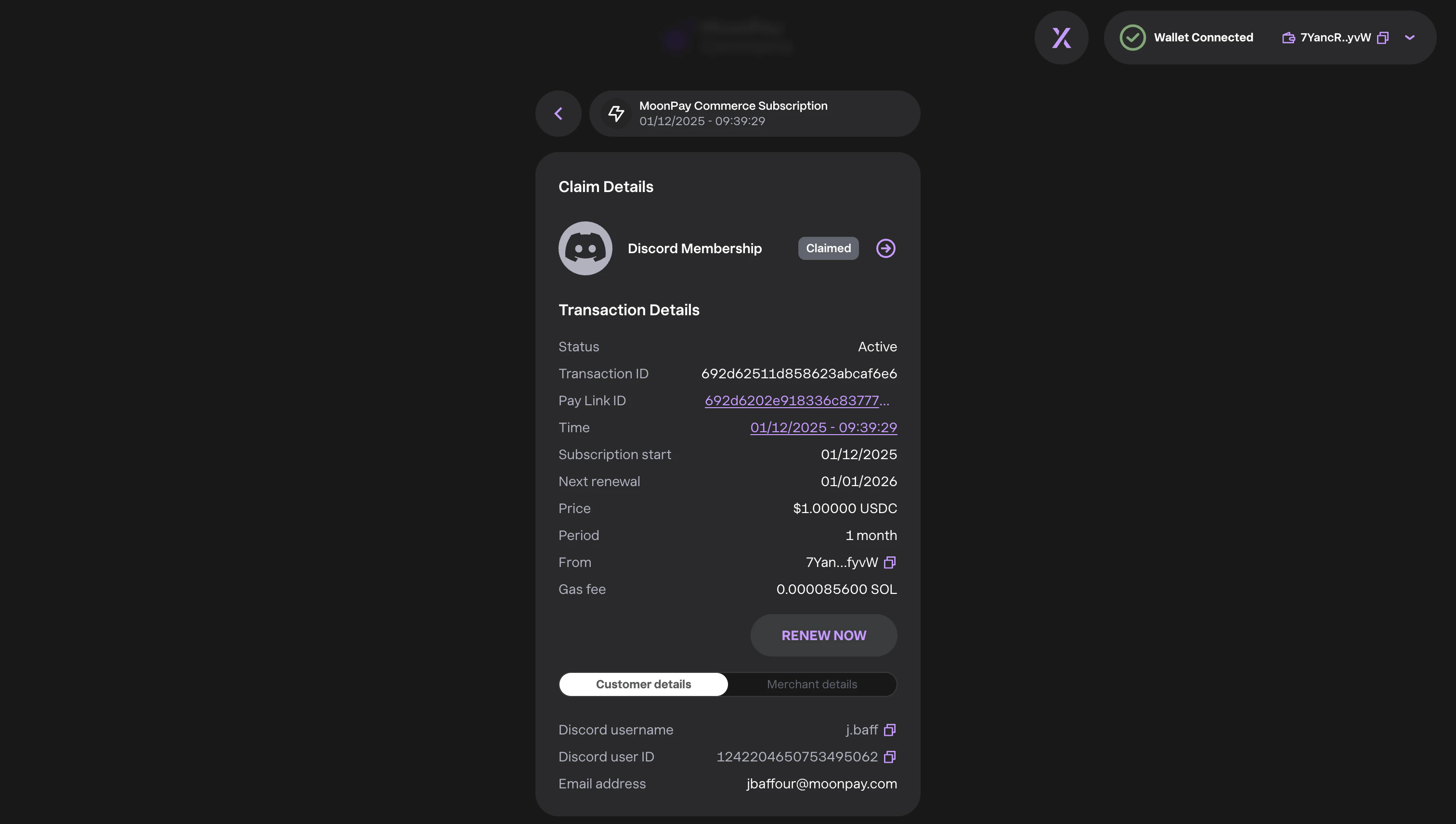 # Setting up a Subscription
Follow these steps to configure a Subscription in your dashboard:
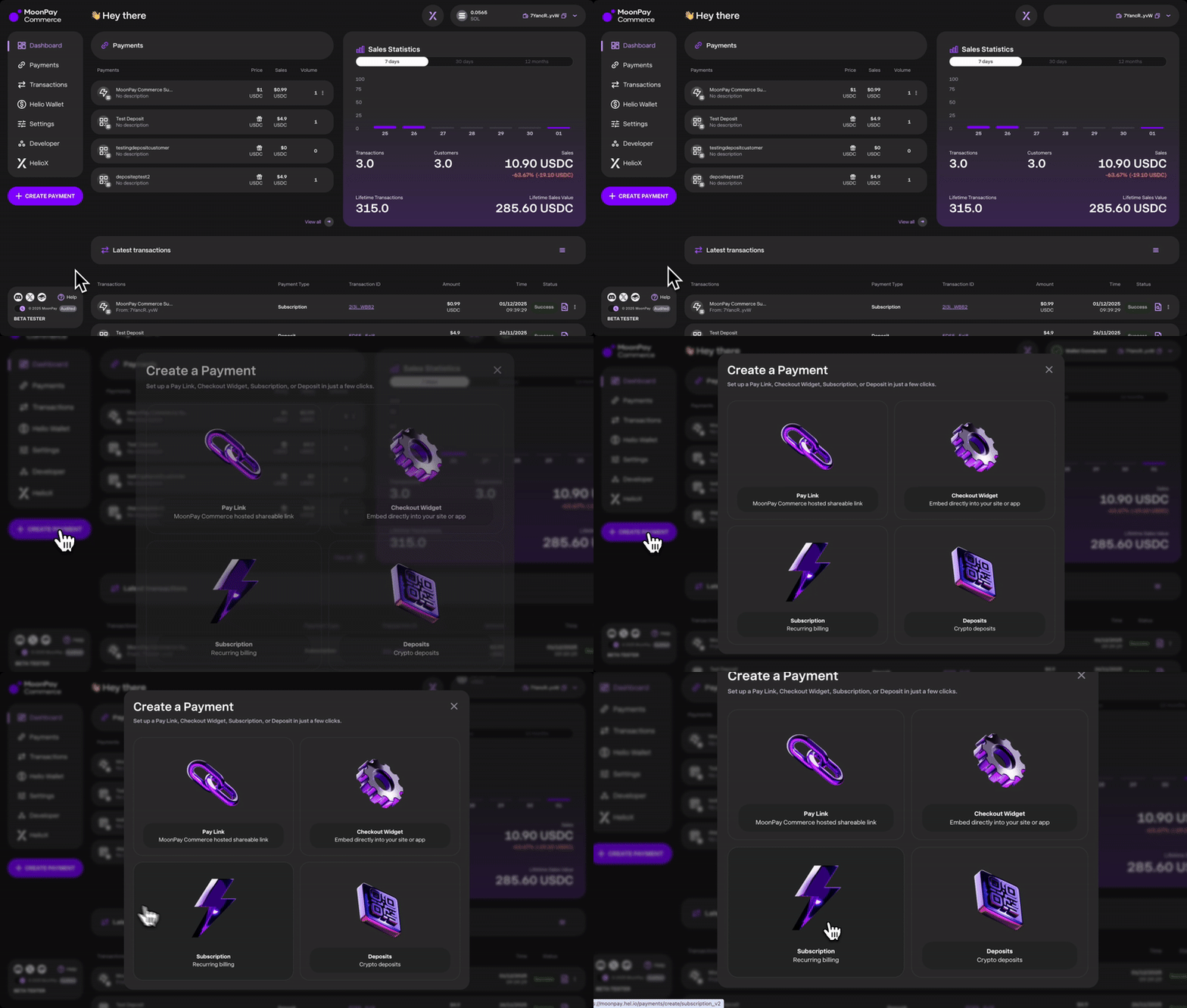
1. [**Create a Pay Link**](http://docs.hel.io/docs/for-creators#create-payments)
* On the dashboard, navigate to **Create Payment** and select the **Subscription** template. You can also embed the Pay Link in your app as a Checkout Widget.
# Setting up a Subscription
Follow these steps to configure a Subscription in your dashboard:
1. [**Create a Pay Link**](http://docs.hel.io/docs/for-creators#create-payments)
* On the dashboard, navigate to **Create Payment** and select the **Subscription** template. You can also embed the Pay Link in your app as a Checkout Widget.
 You can also create subscriptions via the API using the [Create a Pay Link endpoint](https://docs.hel.io/reference/paylink/create). Set `isSubscription: true` in `features` and define `subscriptionDetails`.
2. **Configure your Subscription Pay Link**
* **Billing Settings:** Choose between monthly or annual subscriptions. If you choose monthly you can also enable an optional annual discount.
You can also create subscriptions via the API using the [Create a Pay Link endpoint](https://docs.hel.io/reference/paylink/create). Set `isSubscription: true` in `features` and define `subscriptionDetails`.
2. **Configure your Subscription Pay Link**
* **Billing Settings:** Choose between monthly or annual subscriptions. If you choose monthly you can also enable an optional annual discount.
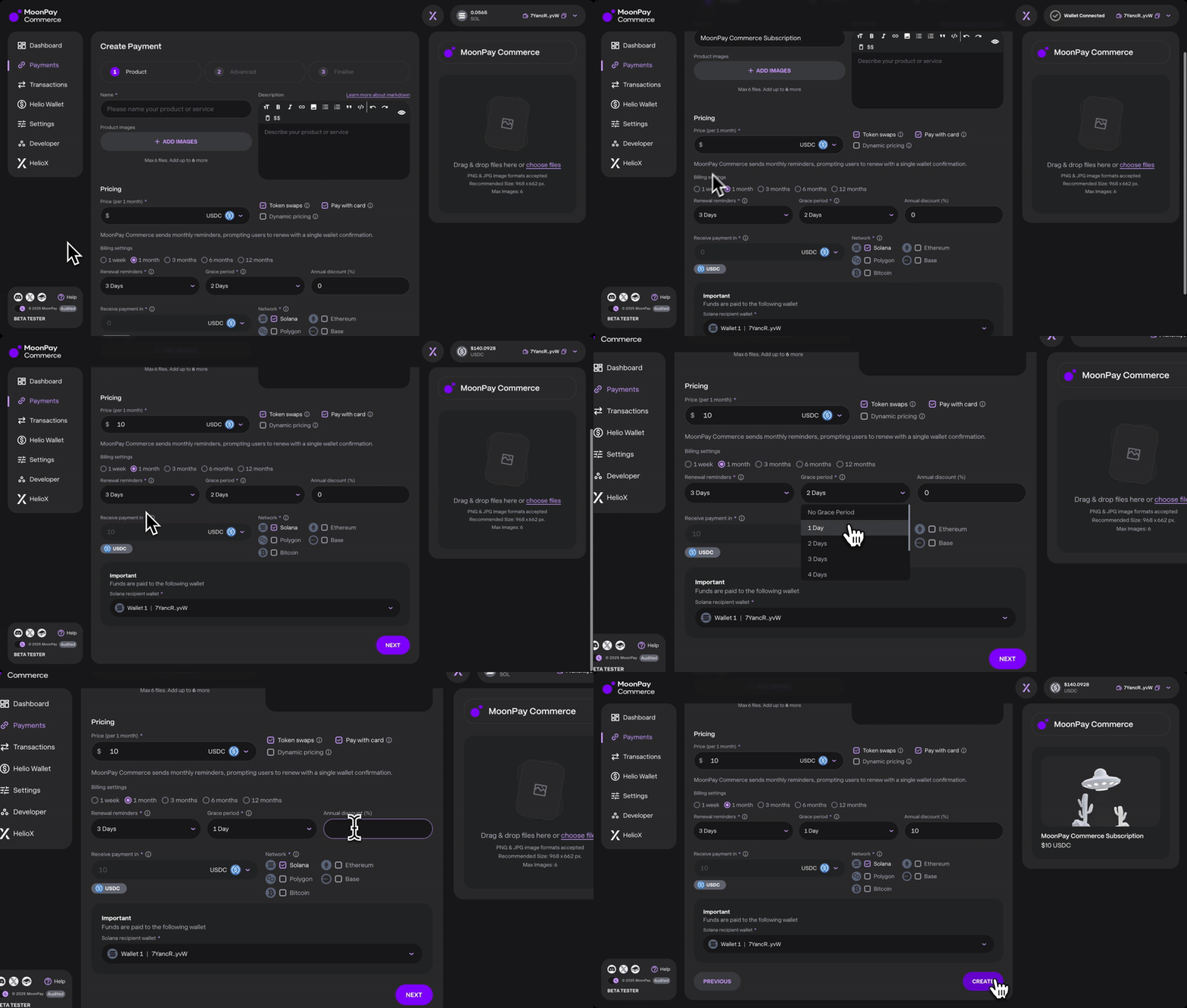 * **Renewal Reminders:** Set the number of days before expiration to send renewal reminders. Customers will receive daily notifications until their subscription ends.
* **Example:** If set to 3, users will receive reminders once per day for the last 3 days of their subscription before it expires.
* **Renewal Reminders:** Set the number of days before expiration to send renewal reminders. Customers will receive daily notifications until their subscription ends.
* **Example:** If set to 3, users will receive reminders once per day for the last 3 days of their subscription before it expires.
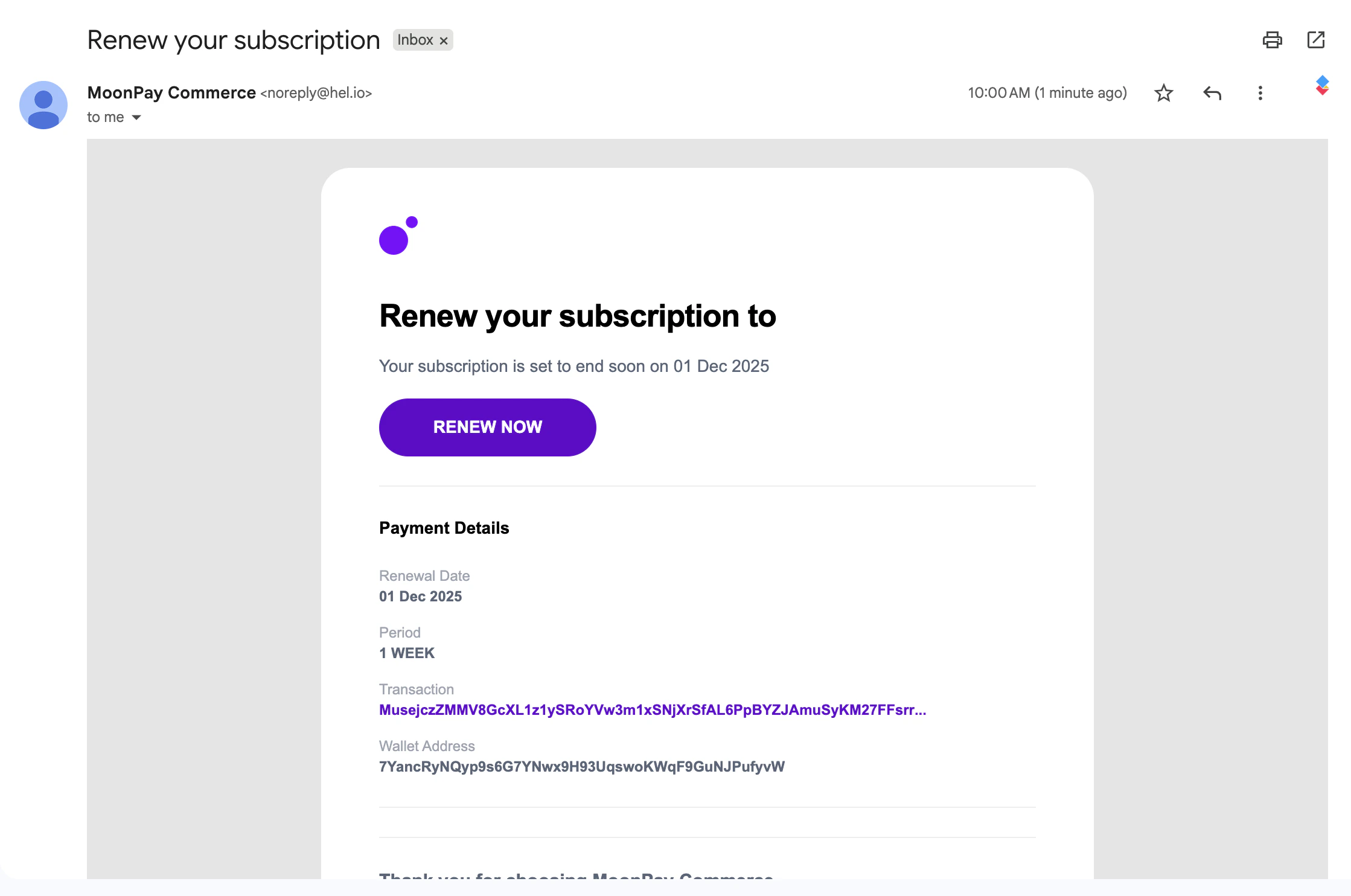 You can test renewal reminders on our development environment [moonpay.dev.hel.io](https://moonpay.dev.hel.io/) . In this environment subscriptions operate on a 5-minute cycle: renewal reminders are sent at 5 minutes, the grace period begins at 10 minutes, and subscription ends after 15 minutes.
* **Grace Period:** Define the number of extra days (if any) during which the customer can still make a payment. The customer’s renewal date remains unchanged. If no payment is made by the renewal date or within the grace period, the subscription will expire automatically.
# Managing and Tracking Subscriptions
Merchants have multiple ways to track and manage subscriptions on the platform:
1. [**Webhooks**](/reference/webhook/overview#/)
* Setup webhooks to receive real time notifications when a subscription starts, renews and ends.
* This enables you to automate subscription management and integrate it into your existing system.
2. [**API**](https://docs.hel.io/reference/getting-started)
* You can retrieve a specific subscription by querying its details via API, allowing you to check its status and other relevant information.
* You can also fetch all subscriptions under your account, providing an overview of active, expired, and canceled subscriptions.
* You can programatically create subscription pay links
3. [**Discord Memberships**](/docs/discord-memberships#/)
* The Discord bot assigns a role when a subscription starts and removes the role when a subscription ends.
# Cancelling Subscriptions
1. **Cancel and Individual Subscription**
* The subscription automatically expires when the user decides not to renew.
2. **Cancel All Subscriptions**
* Disable the Pay Link, which will prevent all users from renewing their subscriptions.
# Anonymous Subscriptions
You can disable email reminders and rely entirely on webhooks, allowing you to handle renewal notifications through your own in-app reminders or automated workflows.
**To set this up:**
1. **Create the Subscription Pay Link via API**
* [Create a pay link via API](https://docs.hel.io/reference/paylink/create) . In your request, set `"isSubscription": true` inside the features object, and include the subscriptionDetails object with relevant subscription configuration. To disable email reminders, set `"isAnonymous": true` inside the `subscriptionDetails` object.
```bash JSON theme={null}
"features": {
"isSubscription": true
}
```
```bash JSON theme={null}
"subscriptionDetails": {
"renewalReminders": 2,
"gracePeriod": 3,
"annualDiscountBps": 10,
"interval": "QUARTER",
"isAnonymous": true
}
```
2. **Create a Subscription Webhook**
* Once the subscription is created, you can set up a [subscription webhook](https://docs.hel.io/reference/webhook/paylink-subscription/create). We will send the following webhook events to your system: `SUBSCRIPTION_STARTED` (when the subscription begins), `SUBSCRIPTION_PENDING_PAYMENT` (for renewal and grace period payments) and `SUBSCRIPTION_ENDED` (if the buyer fails to pay or the subscription finishes)
* Each webhook payload will include a `nextChargeUrl` and `chargeTokenfield`. This is the direct link to the buyer’s payment page for the next renewal. You can use this URL to prompt the buyer within your own product or notification system. For example:
```bash JSON theme={null}
"nextChargeUrl": "https://app.dev.hel.io/charge/7e75a4fb-32fd-4aa9-b787-b4ca04289932",
"chargeToken": "7e75a4fb-32fd-4aa9-b787-b4ca04289932"
```
Alternatively, the buyer can log into [moonpay.hel.io](https://moonpay.hel.io/) and access the Buyer Dashboard by toggling between the Merchant/Buyer Dashboard option at the top of the page.
You can view more about our webhooks [here](https://docs.hel.io/reference/webhook/overview#/).
You can test renewal reminders on our development environment [moonpay.dev.hel.io](https://moonpay.dev.hel.io/) . In this environment subscriptions operate on a 5-minute cycle: renewal reminders are sent at 5 minutes, the grace period begins at 10 minutes, and subscription ends after 15 minutes.
* **Grace Period:** Define the number of extra days (if any) during which the customer can still make a payment. The customer’s renewal date remains unchanged. If no payment is made by the renewal date or within the grace period, the subscription will expire automatically.
# Managing and Tracking Subscriptions
Merchants have multiple ways to track and manage subscriptions on the platform:
1. [**Webhooks**](/reference/webhook/overview#/)
* Setup webhooks to receive real time notifications when a subscription starts, renews and ends.
* This enables you to automate subscription management and integrate it into your existing system.
2. [**API**](https://docs.hel.io/reference/getting-started)
* You can retrieve a specific subscription by querying its details via API, allowing you to check its status and other relevant information.
* You can also fetch all subscriptions under your account, providing an overview of active, expired, and canceled subscriptions.
* You can programatically create subscription pay links
3. [**Discord Memberships**](/docs/discord-memberships#/)
* The Discord bot assigns a role when a subscription starts and removes the role when a subscription ends.
# Cancelling Subscriptions
1. **Cancel and Individual Subscription**
* The subscription automatically expires when the user decides not to renew.
2. **Cancel All Subscriptions**
* Disable the Pay Link, which will prevent all users from renewing their subscriptions.
# Anonymous Subscriptions
You can disable email reminders and rely entirely on webhooks, allowing you to handle renewal notifications through your own in-app reminders or automated workflows.
**To set this up:**
1. **Create the Subscription Pay Link via API**
* [Create a pay link via API](https://docs.hel.io/reference/paylink/create) . In your request, set `"isSubscription": true` inside the features object, and include the subscriptionDetails object with relevant subscription configuration. To disable email reminders, set `"isAnonymous": true` inside the `subscriptionDetails` object.
```bash JSON theme={null}
"features": {
"isSubscription": true
}
```
```bash JSON theme={null}
"subscriptionDetails": {
"renewalReminders": 2,
"gracePeriod": 3,
"annualDiscountBps": 10,
"interval": "QUARTER",
"isAnonymous": true
}
```
2. **Create a Subscription Webhook**
* Once the subscription is created, you can set up a [subscription webhook](https://docs.hel.io/reference/webhook/paylink-subscription/create). We will send the following webhook events to your system: `SUBSCRIPTION_STARTED` (when the subscription begins), `SUBSCRIPTION_PENDING_PAYMENT` (for renewal and grace period payments) and `SUBSCRIPTION_ENDED` (if the buyer fails to pay or the subscription finishes)
* Each webhook payload will include a `nextChargeUrl` and `chargeTokenfield`. This is the direct link to the buyer’s payment page for the next renewal. You can use this URL to prompt the buyer within your own product or notification system. For example:
```bash JSON theme={null}
"nextChargeUrl": "https://app.dev.hel.io/charge/7e75a4fb-32fd-4aa9-b787-b4ca04289932",
"chargeToken": "7e75a4fb-32fd-4aa9-b787-b4ca04289932"
```
Alternatively, the buyer can log into [moonpay.hel.io](https://moonpay.hel.io/) and access the Buyer Dashboard by toggling between the Merchant/Buyer Dashboard option at the top of the page.
You can view more about our webhooks [here](https://docs.hel.io/reference/webhook/overview#/).