> ## Documentation Index
> Fetch the complete documentation index at: https://docs.hel.io/llms.txt
> Use this file to discover all available pages before exploring further.
# Webhooks
> Getting started with our webhooks
To get started with Webhooks, check out our [API Reference](https://docs.hel.io/reference/webhook/overview) for full details.
MoonPay Commerce Webhooks allow your backend to listen for real-time payment events and programmatically verify transactions.
## Configuration
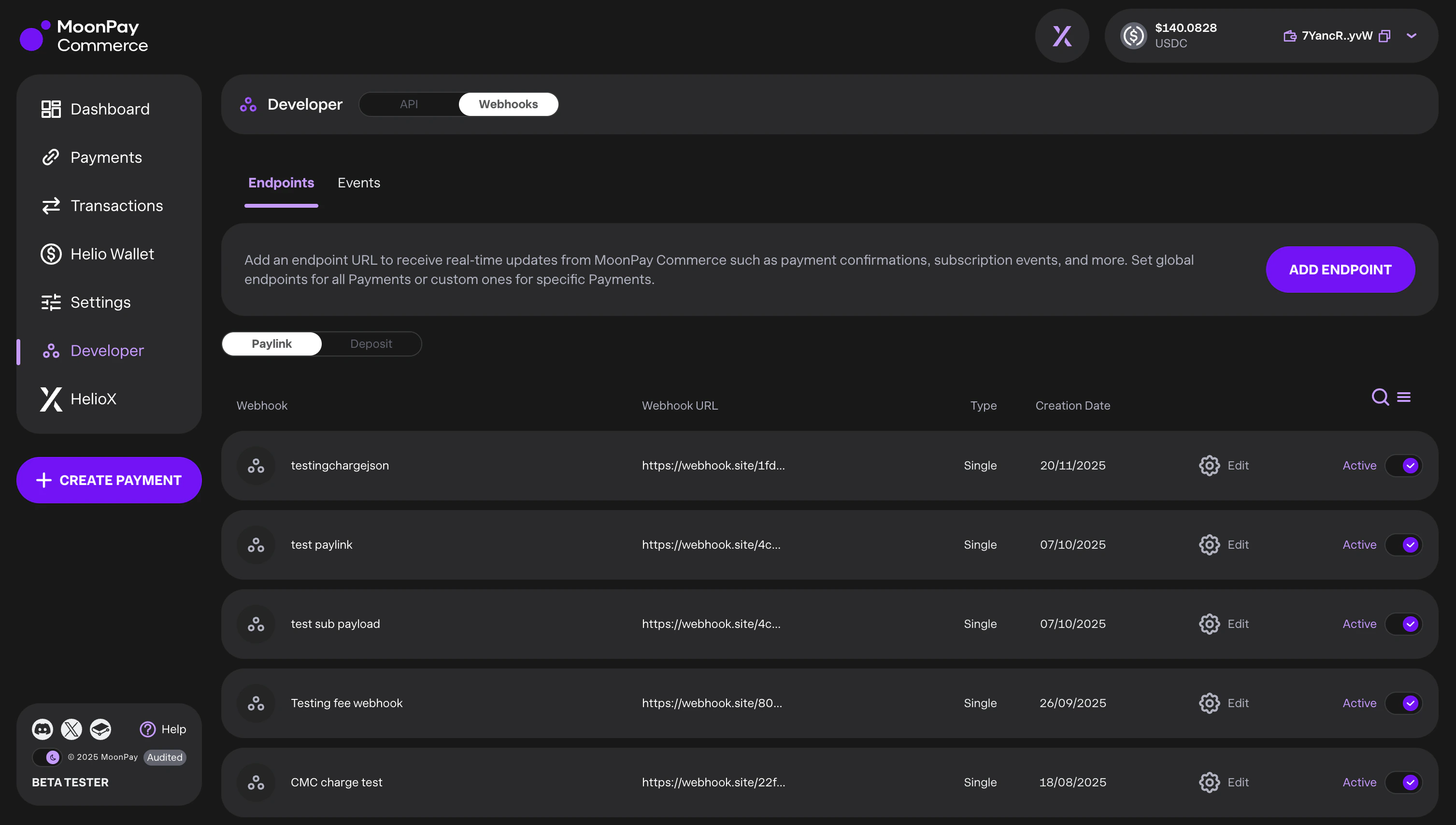
You can create and manage webhooks via the API or the Dashboard (Developers → Webhooks). We support two event types:
* `depositId`: Events related to customer deposits.
* `paylinkId`: Events related to specific checkout links.
## Webhook Scope
For both event types, you can configure the scope of the notifications:
* Global: Receive events for all IDs associated with your company account.
* Resource-Specific: Receive events only for a specifically defined `depositId` or `paylinkId`.
## Deposit-customer quota alerts
If you use [deposit customers](https://docs.hel.io/reference/deposit-customers/create), a **global** deposit webhook (no `depositId`) also receives company-level alerts when you approach your daily deposit-customer creation limit (`DEPOSIT_CUSTOMER_QUOTA_WARNING`, `DEPOSIT_CUSTOMER_QUOTA_CRITICAL`, `DEPOSIT_CUSTOMER_QUOTA_REACHED`). See [Deposit-customer quota alerts](https://docs.hel.io/reference/webhook/overview#deposit-customer-quota-alerts) in the API Reference for configuration, payloads, and delivery details.
## Below-minimum deposit alerts
Deposit webhooks (global or deposit-scoped) can receive `DEPOSIT_BELOW_MINIMUM` when a user has sent funds above the dust floor but still below the sweep minimum — useful for prompting top-ups before settlement. See [Below-minimum deposit alerts](https://docs.hel.io/reference/webhook/overview#below-minimum-deposit-alerts) in the API Reference for setup, payloads, and delivery rules.
## Monitoring & Retries
The Dashboard provides full visibility into your webhook health:
* Event Logs: View triggered events, delivery statuses, and timestamps.
* Retry Logic: We automatically attempt redelivery up to 12 times.
* Manual Replay: If the automatic retry limit is reached, you can manually trigger a replay from the event log.
 ## Webhook Security
Every webhook request sent by MoonPay Commerce includes two layers of authentication:
1. **Bearer Token** — An `Authorization: Bearer ` header that confirms the request originates from MoonPay Commerce.
2. **HMAC Signature** — An `X-Signature` header containing an HMAC-SHA256 hex digest of the request body, keyed with the same `sharedToken`. This guarantees the payload has not been tampered with in transit.
The `sharedToken` is generated when you [create a webhook](https://docs.hel.io/reference/webhook/create) and is returned only once. Store it securely — you will need it to verify incoming webhook signatures. For the full list of headers included with each webhook delivery, see the [Webhook Request Headers](https://docs.hel.io/reference/webhook/overview#webhook-request-headers) in the API Reference.
## Verifying Webhook Signatures
When your server receives a webhook, you should verify the `X-Signature` header to confirm payload integrity. Here is how:
1. Extract the `X-Signature` header from the incoming HTTP request.
2. Read the **raw request body** as a string (before any JSON parsing that might reorder keys).
3. Compute the HMAC-SHA256 digest of the raw body using your `sharedToken` as the key.
4. Compare your computed signature with the `X-Signature` value using a **timing-safe comparison**.
### Node.js / TypeScript
```typescript theme={null}
import * as crypto from "crypto";
function verifyWebhookSignature(
rawBody: string,
receivedSignature: string,
sharedToken: string
): boolean {
const computedSignature = crypto
.createHmac("sha256", sharedToken)
.update(rawBody)
.digest("hex");
const sigBuffer = Buffer.from(receivedSignature, "hex");
const computedBuffer = Buffer.from(computedSignature, "hex");
if (sigBuffer.length !== computedBuffer.length) {
return false;
}
return crypto.timingSafeEqual(sigBuffer, computedBuffer);
}
// Example usage in an Express handler
app.post("/webhook", (req, res) => {
const signature = req.headers["x-signature"] as string;
const rawBody = req.body; // Ensure you use a raw body parser (e.g. express.raw())
if (!verifyWebhookSignature(rawBody, signature, SHARED_TOKEN)) {
return res.status(401).send("Invalid signature");
}
// Signature is valid — process the webhook event
const payload = JSON.parse(rawBody);
// ...
res.status(200).send("OK");
});
```
### Python
```python theme={null}
import hmac
import hashlib
def verify_webhook_signature(
raw_body: bytes,
received_signature: str,
shared_token: str
) -> bool:
computed_signature = hmac.new(
shared_token.encode("utf-8"),
raw_body,
hashlib.sha256
).hexdigest()
return hmac.compare_digest(computed_signature, received_signature)
```
Always use a **timing-safe comparison** function (such as `crypto.timingSafeEqual` in Node.js or `hmac.compare_digest` in Python) when comparing signatures. A standard string comparison (`===` or `==`) is vulnerable to timing attacks.
## Webhook Security
Every webhook request sent by MoonPay Commerce includes two layers of authentication:
1. **Bearer Token** — An `Authorization: Bearer ` header that confirms the request originates from MoonPay Commerce.
2. **HMAC Signature** — An `X-Signature` header containing an HMAC-SHA256 hex digest of the request body, keyed with the same `sharedToken`. This guarantees the payload has not been tampered with in transit.
The `sharedToken` is generated when you [create a webhook](https://docs.hel.io/reference/webhook/create) and is returned only once. Store it securely — you will need it to verify incoming webhook signatures. For the full list of headers included with each webhook delivery, see the [Webhook Request Headers](https://docs.hel.io/reference/webhook/overview#webhook-request-headers) in the API Reference.
## Verifying Webhook Signatures
When your server receives a webhook, you should verify the `X-Signature` header to confirm payload integrity. Here is how:
1. Extract the `X-Signature` header from the incoming HTTP request.
2. Read the **raw request body** as a string (before any JSON parsing that might reorder keys).
3. Compute the HMAC-SHA256 digest of the raw body using your `sharedToken` as the key.
4. Compare your computed signature with the `X-Signature` value using a **timing-safe comparison**.
### Node.js / TypeScript
```typescript theme={null}
import * as crypto from "crypto";
function verifyWebhookSignature(
rawBody: string,
receivedSignature: string,
sharedToken: string
): boolean {
const computedSignature = crypto
.createHmac("sha256", sharedToken)
.update(rawBody)
.digest("hex");
const sigBuffer = Buffer.from(receivedSignature, "hex");
const computedBuffer = Buffer.from(computedSignature, "hex");
if (sigBuffer.length !== computedBuffer.length) {
return false;
}
return crypto.timingSafeEqual(sigBuffer, computedBuffer);
}
// Example usage in an Express handler
app.post("/webhook", (req, res) => {
const signature = req.headers["x-signature"] as string;
const rawBody = req.body; // Ensure you use a raw body parser (e.g. express.raw())
if (!verifyWebhookSignature(rawBody, signature, SHARED_TOKEN)) {
return res.status(401).send("Invalid signature");
}
// Signature is valid — process the webhook event
const payload = JSON.parse(rawBody);
// ...
res.status(200).send("OK");
});
```
### Python
```python theme={null}
import hmac
import hashlib
def verify_webhook_signature(
raw_body: bytes,
received_signature: str,
shared_token: str
) -> bool:
computed_signature = hmac.new(
shared_token.encode("utf-8"),
raw_body,
hashlib.sha256
).hexdigest()
return hmac.compare_digest(computed_signature, received_signature)
```
Always use a **timing-safe comparison** function (such as `crypto.timingSafeEqual` in Node.js or `hmac.compare_digest` in Python) when comparing signatures. A standard string comparison (`===` or `==`) is vulnerable to timing attacks.