> ## Documentation Index
> Fetch the complete documentation index at: https://docs.hel.io/llms.txt
> Use this file to discover all available pages before exploring further.
# Getting Started
> Use the API to create payments and track transactions
# Pre-requisites
**Note:** When using the production environment at [moonpay.hel.io](http://app.hel.io), set your API endpoint to `api.hel.io/v1` and generate API keys there. For the development environment, use `api.dev.hel.io/v1` and generate API keys from [moonpay.dev.hel.io](http://app.dev.hel.io).
In order to perform actions using our API, you need to complete the following steps.
## 1. Create your Account & get API keys
* Go to our [dashboard](https://moonpay.hel.io/) and log in.
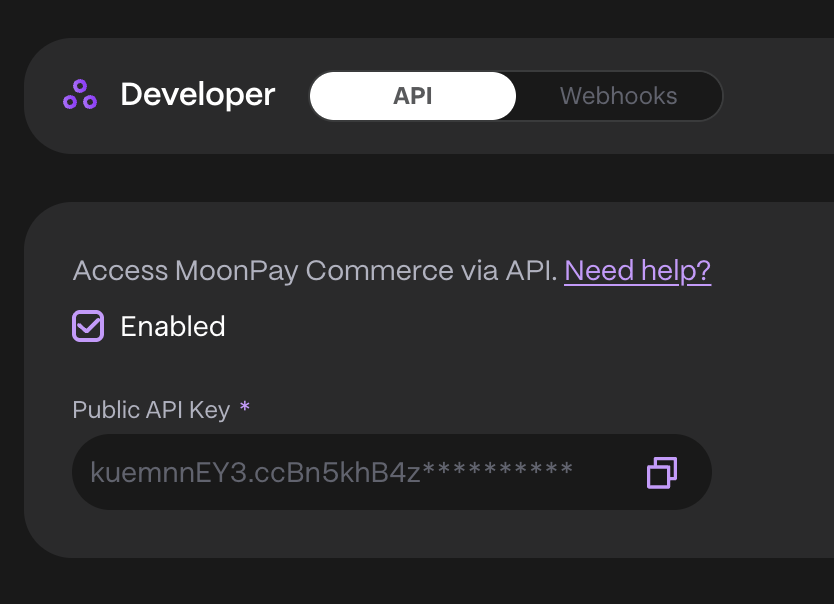
* Under **Developer -> API**, check **Enable** to generate your Public and Secret API Keys.
* Save these securely, as the Secret API Key won't be retrievable later (you can regenerate both if needed).
# Prepare Request Payload for paylinkId
When creating a [Pay Link via API](https://docs.hel.io/reference/paylink/overview), you'll need to specify the recipient wallet, payment currency, and accepted recipient currencies — so it's important to gather this information beforehand. Here's how to do it.
```json JSON theme={null}
"recipients": [
{
"walletId": "YOUR_WALLET_ID",
"currencyId": "6340313846e4f91b8abc519b"
}
]
```
## 1. Retrieving your Wallet ID
You can retrieve your Wallet ID in one of the following ways:
### Option 1: Via the Dashboard
* Navigate to the [Helio Dashboard](https://app.hel.io/)
* Go to **Settings → Wallets**
* Click the three dots next to your wallet and select **Copy wallet ID**
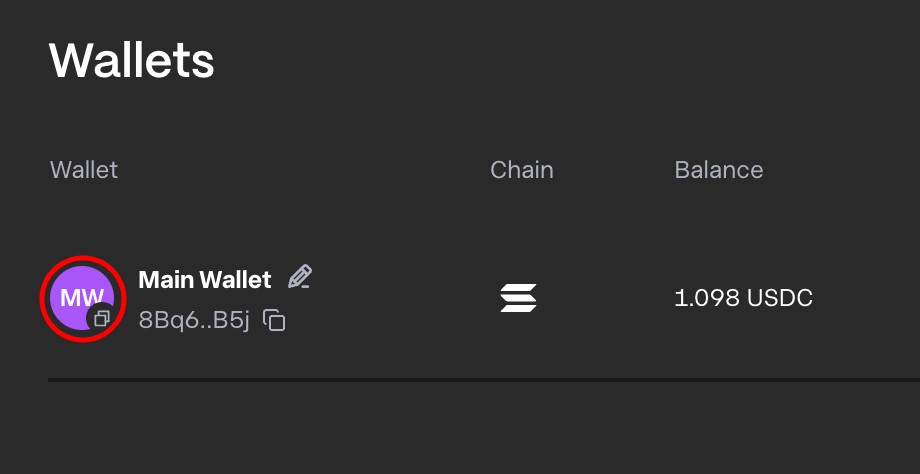
**Note:** The Helio ID is different from your wallet's public key.
### Option 2: Via the API
* Call the [Get wallets](https://docs.hel.io/reference/wallet/list) endpoint
* Use the `id` field from the wallet object returned in the response
## 2. Retrieving the Currency Id
To retrieve the `currencyId` use our Get Currency endpoint [here](/reference/currency/list).